
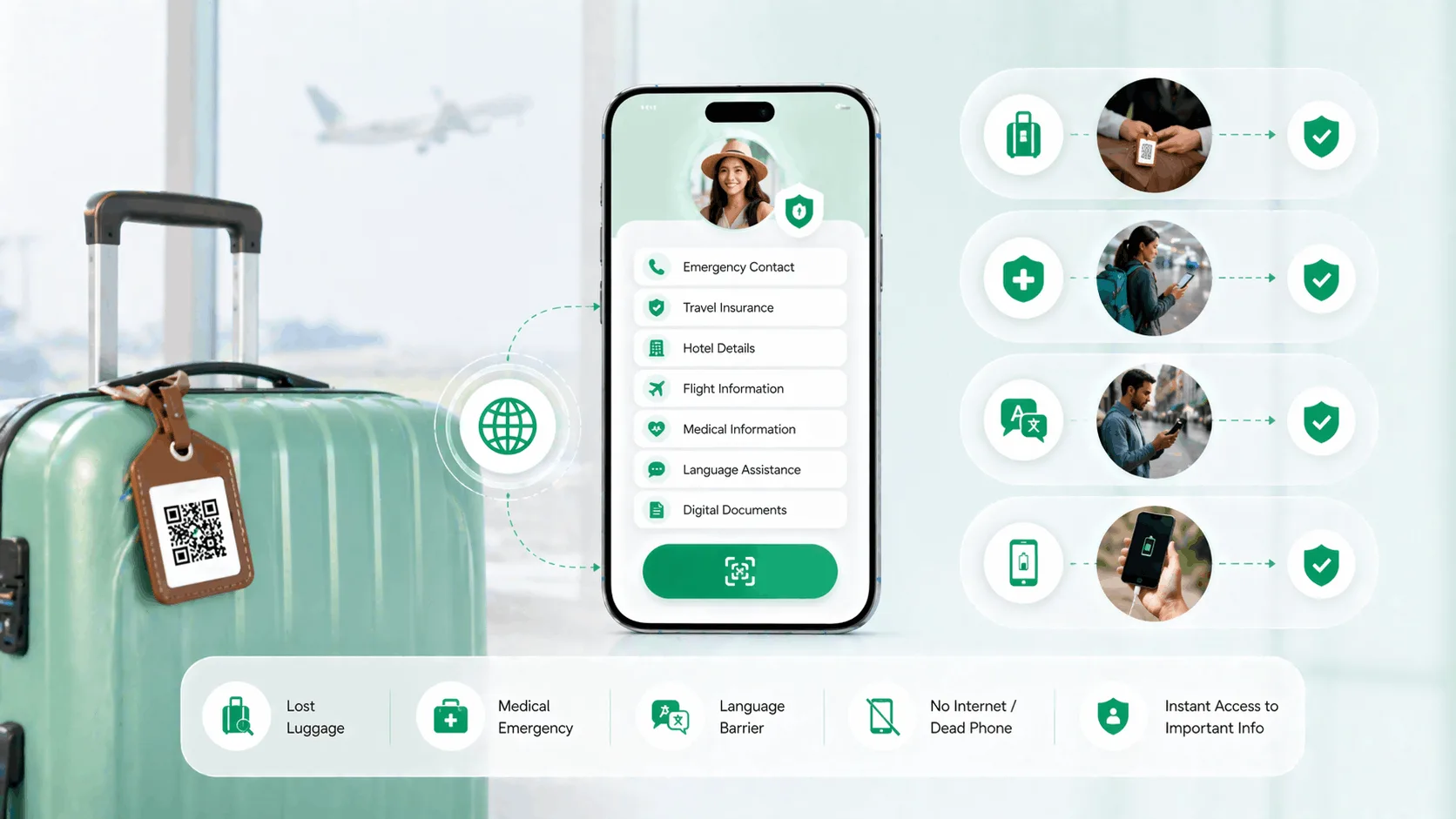
A travel safety QR code turns a sticker on your luggage or a card in your wallet into an emergency identity that any phone in the world can read. Whoever finds your bag, or finds you after an accident, scans it and sees your emergency contacts, medical notes and insurer's helpline in seconds, with no app, no battery and no language in common. The other travel safety tips below, from lost luggage to a dead phone, all end at the same ten-minute setup.
Before you pack
- A printed code works when a tracker or an app does not: no charge, no pairing, no roaming plan on the finder's side beyond a data connection.
- Put the same code in five places: every bag, your wallet, the passport holder, the hotel desk and the hire car.
- The profile, not the sticker, holds the details, so you update insurance and hotel information before each trip without reprinting anything.
- You choose which contact options a finder sees, so you stay reachable without your personal number printed on a bag that many strangers will handle.
Which travel problems does a QR code solve?
Travel creates a short list of moments when normal communication fails, and a scannable profile is unusually well suited to each of them.
Lost luggage. The airline tag tears off and your checked bag lands in another city. The only way back to you is the contact information on or in the bag, and a code on the outside gives a handler, a fellow passenger or an airline desk a direct path to you without the booking reference.
A medical emergency abroad. You are disoriented or unconscious after an accident. The paramedic needs your blood group, drug allergies, current medication and insurer's assistance line, and your locked phone cannot give it to them, while a card in the wallet can.
A language barrier. A profile does not translate itself, but it hands anyone with a phone a structured page of the facts that matter: your hotel, your contact, your medical needs, when neither side can follow a conversation.
A dead phone. Zero battery means no contacts, no maps and no booking confirmations. A printed card in your passport holder keeps all of that reachable, for you and for whoever is helping you.
Where should a QR code for travel safety go?
Five placements cover almost every scenario, and they all point at the same profile, so there is nothing extra to maintain.
| Placement | Who scans it | The moment it is for |
|---|---|---|
| Luggage tag on every checked bag and carry-on | Baggage handlers, airline desks, other travellers | A bag lost in transit or left behind |
| Wallet card behind your ID | Paramedics, bystanders, police | An accident, a medical episode, theft recovery |
| Passport holder sleeve | Consulate staff, airport security | Distress at a border or in an airport |
| Card left at the hotel front desk | Hotel staff | Solo travel, or a destination where medical communication is hard |
| Card on the dashboard of a hire car or transfer | Emergency responders | An incident during the journey itself |
The luggage tag is the placement people use most and the one worth buying a proper tag for, since a laminated printout rarely survives a baggage belt; the smart luggage tag guide compares QR, Bluetooth and AirTag options for bags specifically.
What should an emergency QR for travel contain?
Think of the profile as the information a stranger would need in the first five minutes of helping you, and keep it current before every trip.
- Emergency contacts: two people, with international dialling codes, plus your embassy's number for the destination.
- Medical facts: blood group, drug and food allergies, current medication by name, chronic conditions such as diabetes or epilepsy, and your doctor at home.
- Insurance: the provider, the policy number and, above all, the 24-hour assistance line.
- Trip details: the hotel name and address for the current leg, and a one-line language note such as "English and Hindi speaker".
How do I stay reachable without sharing my number with strangers?
On a trip the code may be scanned by airline staff, a concierge, a stranger who found your bag or a bystander at an accident, most of whom you will never meet. The travel profile lets you choose which contact options appear: a call button, a WhatsApp button or a backup contact. A finder reaches you through the profile, and your personal number is not printed anywhere for them to save.
Where a QR profile is clearly better
- Any phone camera reads it, in any country, with no app on either side
- Nothing to charge; the finder's phone does the work
- One profile feeds every tag and card, so updates happen once
- Shows medical and insurance details that no tracker carries
Where a tracker or an app falls short
- A Bluetooth tracker tells you where the bag is; it does not tell the finder who you are
- A phone app needs the finder to have it installed, and needs your phone to be charged and unlocked
- A paper note in the bag is readable only once the bag is opened, usually by the wrong person
How long does the setup take?
About ten minutes. Create a Travel profile, add two emergency contacts with country codes, fill in the medical section fully, add the insurer's assistance line, choose which contact options are visible, then download the code and print it onto a luggage tag, two or three wallet cards and a passport-holder card. Scan each one yourself before you leave home. Before every later trip, update only the insurance and hotel lines; the rest stays current.
Three things to know before you rely on it
- The finder needs a smartphone with a data connection. In an airport, a hospital or a hotel that is a given; on a trek it may not be.
- A code does not locate a bag. If you want to know where the suitcase went, pair it with a tracker; the two solve different problems.
- A stale profile is a liability. An old insurer or a previous trip's hotel in the profile sends a helper the wrong way.
Set up your travel QR profile before the next trip
Pack a travel safety QR code on every bag and in your wallet, set up through the travel profile, and order a smart luggage tag built for baggage recovery. If you travel with a medical condition, the medical emergency QR code guide covers what a first responder needs to see first.